A few days ago, I enabled Cloudflare DNS proxying for great-ui.com. Soon after, I received an automated email from Cloudflare alerting me that the site had crossed 10,000 pageviews. Seeing that notification out of nowhere immediately made me worry that the website was getting hit by a DDoS attack.
My first reaction was to open my PostHog dashboard to see what was happening, check error rates, and see which pages were getting hammered. But PostHog showed a completely different pageview count: 6.1k pageviews (across 1.08k unique visitors).
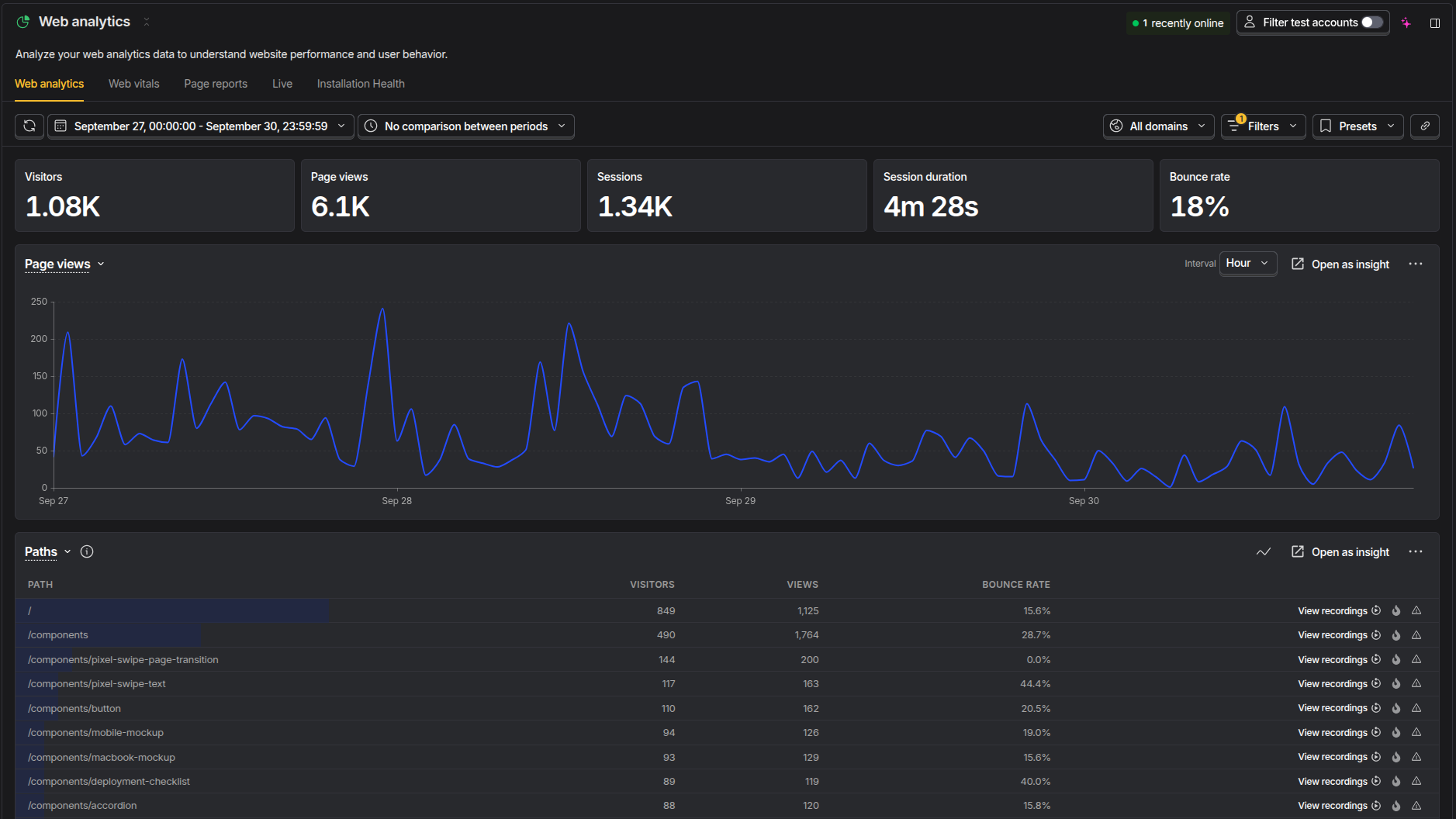 PostHog Web Analytics Dashboard: 6.1k pageviews and 1.08k unique visitors (Sep 27 - Sep 30)
Confused by the large gap, I logged into the Cloudflare analytics dashboard to see what Cloudflare was recording. For the September 27 to September 30 window, Cloudflare reported 17.6k pageviews.
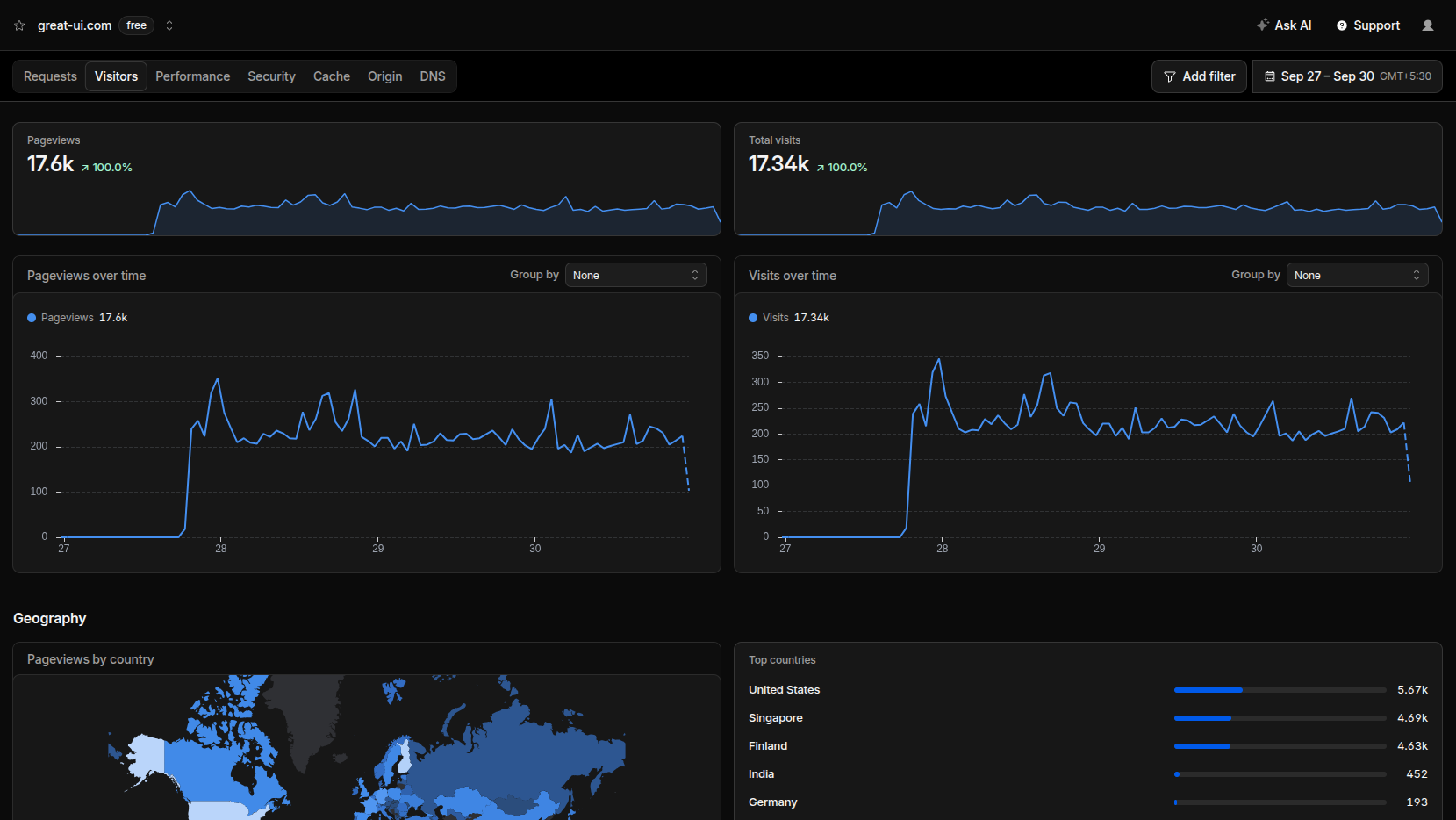 Cloudflare Analytics Dashboard: 17.6k pageviews and 17.34k total visits (Sep 27 - Sep 30)
Both dashboards analyzed the exact same domain over the exact same four-day period. When I switched the DNS nameservers for Cloudflare, I knew it would count every raw HTTP GET request for a web page at the edge, while PostHog only counted pageviews when client-side JavaScript executed. Still, seeing a gap between 17,600 and 6,100 pageviews illustrates how differently the two layers measure a pageview.
To understand why this pageview difference happens, you have to look at where each tool sits in the request lifecycle.
What is a Pageview?
Depending on where measurement happens, a "pageview" means two completely different things:
- Edge / Network Pageview (Cloudflare): Any incoming HTTP/HTTPS request for a document path (like
/or/components/button) reaching the reverse proxy. Cloudflare increments the pageview counter immediately upon receiving the request headers, regardless of who or what made the request. - Client / Browser Pageview (PostHog): An event fired only after the browser downloads the HTML document, parses the DOM, downloads the JavaScript bundle, evaluates the PostHog SDK, and successfully dispatches a
$pageviewtelemetry payload.
Where the Tracker Lives
The diagram below outlines the full client-server lifecycle and highlights where Cloudflare and PostHog capture pageview data:
Request & Response Lifecycle




Why Pageview Counts Differ: The 17.6k to 6.1k Breakdown
When Cloudflare reports 17.6k pageviews and PostHog reports 6.1k, neither number is wrong. They are simply measuring page loads at opposite ends of the web stack.
Out of the 17,600 pageviews logged at Cloudflare's network edge:
- Automated Crawlers & Scrapers (−8,200 / 47%): Search indexers (Googlebot, Bingbot), AI scrapers, and data center bots requesting raw HTML routes. None of these clients evaluate client-side JavaScript.
- Social Link Previews (−2,100 / 12%): Preview bots from Twitter/X, Discord, Slack, and WhatsApp fetching page HTML to extract OpenGraph meta tags.
- Ad-Blockers & Early Exits (−1,200 / 7%): Privacy tools (Brave Shields, uBlock Origin) blocking analytics endpoints, plus visitors closing tabs before the JavaScript bundle finished initializing.
- Verified PostHog Pageviews (= 6,100 / 35%): Real human visitors whose browsers loaded the document, evaluated JavaScript, and successfully dispatched a verified
$pageviewtelemetry event.
How Cloudflare Counts Pageviews
When you enable proxying in Cloudflare DNS, Cloudflare operates as a reverse proxy. Every page request passes through Cloudflare's nearest edge node before reaching your server.
Because Cloudflare counts pageviews at the network edge:
- It counts every document request: Automated search crawlers (Googlebot, Bingbot), AI scrapers, uptime monitors, curl commands, and feed readers all register as pageviews.
- It counts link preview bots: When someone shares a link on Twitter, Discord, Slack, or WhatsApp, the platform's preview crawler requests the page HTML to extract OpenGraph tags. Cloudflare counts this as a pageview.
- Zero code footprint: You do not install a tracking script in your application bundle. Cloudflare gathers pageview metrics directly from edge server logs.
- Immune to client-side blockers: Ad blockers, privacy extensions, and disabled JavaScript in browsers have no effect on Cloudflare pageview counts.
How PostHog Counts Pageviews
PostHog is a product analytics platform designed to understand user behavior inside an application. It relies on a client-side JavaScript SDK installed in your website codebase.
Because PostHog counts pageviews inside the browser runtime:
- Requires JavaScript execution: If a request comes from a crawler, scraper, or link preview bot that does not evaluate JavaScript, PostHog never records a pageview.
- Filters out automated traffic: Headless bots fetching raw HTML without running scripts never trigger the
$pageviewevent. - Affected by ad blockers and privacy settings: Browser extensions like uBlock Origin and privacy-focused browsers like Brave block telemetry requests to analytics endpoints, preventing those pageviews from being counted.
- Focuses on real user navigation: PostHog tracks client-side single-page app transitions (e.g. Next.js router navigations) that never make a full roundtrip to Cloudflare's edge proxy.
Cloudflare vs PostHog: Feature Comparison
| Feature / Dimension | Cloudflare Edge | PostHog Analytics |
|---|---|---|
| Tracking Layer | Network Edge / Reverse Proxy (L4/L7) | Browser DOM Runtime (JavaScript SDK) |
| Pageview Definition | Every incoming HTTP GET document request | Verified JavaScript $pageview event |
| Installation | DNS nameserver proxy (zero code) | Client JavaScript SDK / NPM package |
| Bot & Crawler Traffic | Counts all scrapers, indexers, preview bots | Ignored (bots never evaluate JS) |
| Ad-Blocker Impact | 100% immune (runs at network proxy) | Blocked by default unless reverse-proxied |
| Social Link Previews | Logged as complete pageviews | Not tracked (no DOM evaluation) |
| Single-Page Navigation | Only counts initial hard document load | Captures every client-side route change |
| User Interaction | None (only status codes and bandwidth) | Clicks, session replays, custom events |
| Client Bundle Overhead | 0 KB (server-side edge only) | ~40-60 KB async JavaScript payload |
| Primary Use Case | Infrastructure, DDoS monitoring, CDN cache | Product analytics, funnels, user retention |
Which Pageview Count Should You Trust?
Neither number is wrong; they answer different questions.
- Trust Cloudflare pageviews when you want to measure total load on your servers, CDN caching efficiency, bandwidth costs, and raw scraping volume hitting your routes.
- Trust PostHog pageviews when you want to know how many actual humans rendered your site, read your content, and navigated between pages.
The 11.5k difference between Cloudflare's 17.6k pageviews and PostHog's 6.1k pageviews represents the hidden volume of web crawlers, search indexers, link preview generators, and privacy-shielded visitors.